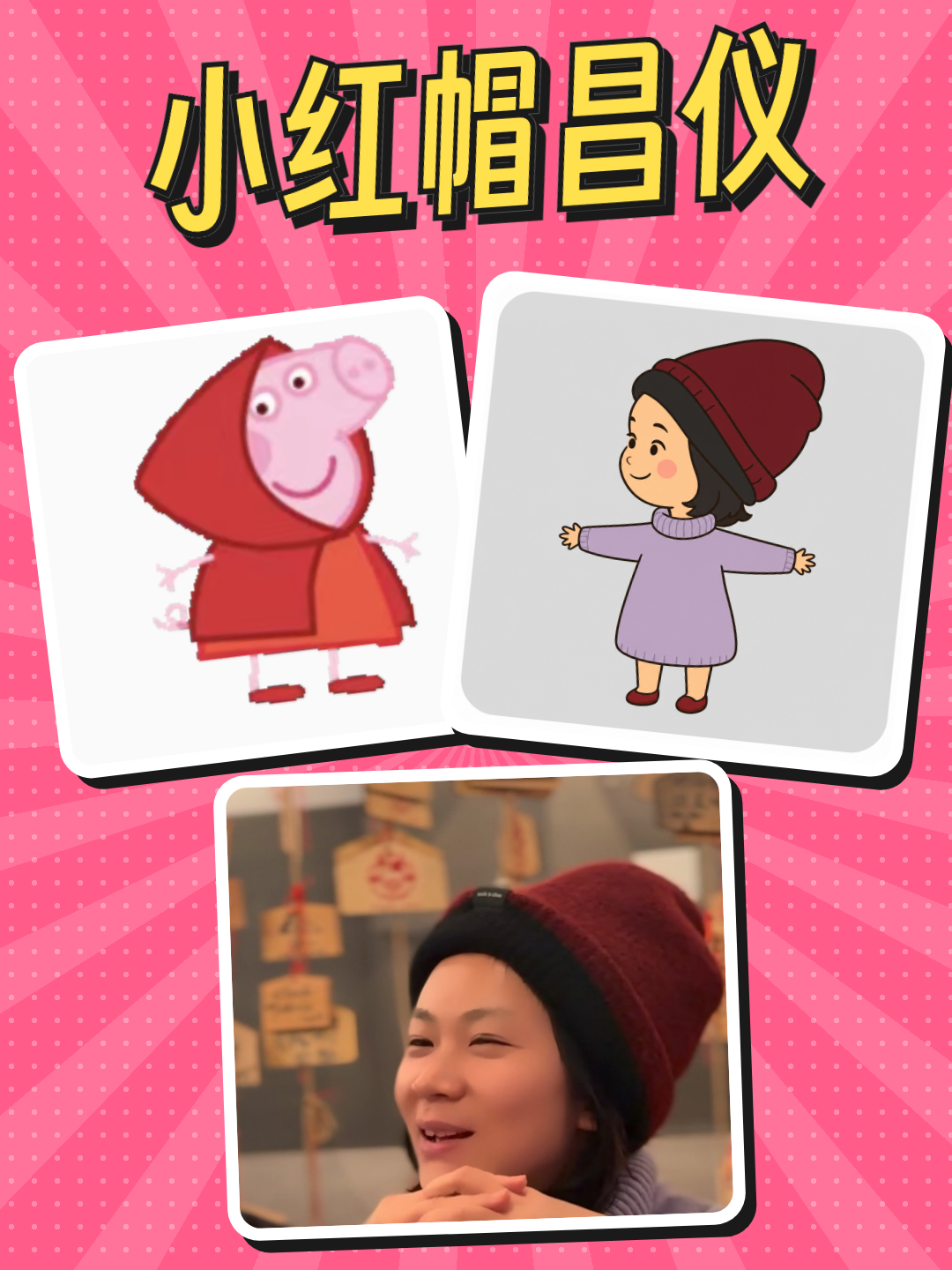

版式还原
成品是否复现作者认可的网点放射线背景、歪斜贴纸和单标题版式
用原素材重渲与认可成品逐像素比较,平均通道差 3.4 / 255,主要差在参考图内边距
Turn a friend's photo and the character they resemble into a punchy lookalike meme: original AI chibi, tilted stickers, one bold title
Free Skill · open source
No Claude or GPT account? You can still try it: a Skill is not tied to one model vendor. Claude is the most dependable, GPT also works, and with only domestic tools you can start from the WorkBuddy option below, though results may differ.
Save your workspace profile once, and Profile-aware Skills can reuse it at runtime.
Configure profileInstall and configure
Best when you use several agents: install, assign, and invoke skills from one workspace.
Done inside Yoda
Yoda syncs the installed skill to configured agents, so you do not have to maintain several directories manually.
First invocation
Use lov-lookalike-meme for the following task and validate the result against the skill's acceptance criteria:Skill declaration: Python 3.9+ with Pillow; Chrome or Chromium for headless rendering; SmileySans font; OPENROUTER_API_KEY for the cartoon step; ffmpeg only for video frames.
给一位真人的照片和一张“像谁”的参考形象图,做出一张网感十足的撞款对比图: AI 以本人照片为参考画原创 Q 版卡通并模仿参考姿势,HTML 排出粉色网点放射线背景、 白边歪斜贴纸和一个黄字黑描边大标题,输出 1080×1440 PNG,卡通另存一张。
npx lovstudio skills add lookalike-meme -g -y
本地源码安装:
ln -s "$(pwd)" "${LOVSTUDIO_SKILLS_INSTALL_DIR:?请设置本地 Skills 目录}/lov-lookalike-meme"
对 Agent 说:
Agent 会先确认本人同意、说明照片会上传到 OpenRouter、报价,然后:
# 1. 取帧裁剪
python3 scripts/prep_photo.py --video clip.mp4 --time 00:12:03 --out work/frame.png
python3 scripts/prep_photo.py --image work/frame.png --crop 280,620,520,520 --out work/photo-crop.jpg

# 2. 原创 Q 版(付费,约 USD 0.17–0.25 / 张,写入 ledger/costs.jsonl)
python3 scripts/gen_cartoon.py --quote
python3 scripts/gen_cartoon.py --photo work/frame.png \
  --features "yellow raincoat, round glasses" \
  --pose "both arms stretched out to the sides" \
  --out work/cartoon.png --ledger ledger/costs.jsonl

# 3. 排版
python3 scripts/render_meme.py --title "鸭鸭本鸭" \
  --sticker work/ref.png#contain --sticker work/cartoon.png --sticker work/photo-crop.jpg \
  --out work/meme.png
skill.yaml 声明 user-profile/v1。长期偏好(如默认配色、生图模型、账本路径)写入
skills.lov-lookalike-meme.records:
python3 scripts/profile_store.py record --skill-id lov-lookalike-meme \
  --path records.default_palette --value blue --confirm
详见 references/user-profile.md。
OPENROUTER_API_KEY(卡通步骤)lov-branding-consistencypython3 scripts/validate_skill.py .
MIT
Used this Skill? Share a real result you are happy with, by writing it yourself or asking an agent to prepare it.
把一位真人的现场照片和一张参考形象图做成网感撞款表情包:AI 以本人照片为参考画原创 Q 版卡通并模仿参考姿势,HTML 排版出亮色网点放射线背景、白边歪斜贴纸和单个大标题的 1080×1440 PNG,另附卡通 PNG。
Cases
—
Loading cases…
Dimensions
4
quality dimensions with evidence
Access
Free
Open source and ready to install
Use case
活动、聚会或节目里有人和某个卡通角色撞款,想快速做一张可发群的像不像对比图
Owner · LovStudio
Skill output
一张可直接发群的竖版对比图和一张独立卡通图,附本次费用与版权提示。
PNG 尺寸 1080×1440; 标题与贴纸完整、无裁切; 卡通像本人、姿势对上、无文字水印; 账本有本次调用记录
Requirements
OPENROUTER_API_KEY(仅卡通步骤,从环境变量读取)
lov-branding-consistency
Risks & mitigations
未经本人同意用真人肖像做梗图 · 同意是第一道门禁,未确认不做
+4 more
成品是否复现作者认可的网点放射线背景、歪斜贴纸和单标题版式
用原素材重渲与认可成品逐像素比较,平均通道差 3.4 / 255,主要差在参考图内边距
卡通是否保留本人辨识特征并对上参考姿势
首个真实案例中卡通保留了本人的撞款元素、发型和衣服配色,姿势与参考角色一致
单张成品的付费调用次数与费用
首个真实案例 1 次成功调用 USD 0.2335,另 1 次网络中断记为未知费用;排版本地完成
是否在生成前完成同意、上传告知、报价,并在交付时标注版权
门禁写入 SKILL.md 必经步骤;生图脚本只上传真人照片
Deliver a share-ready lookalike comparison image and a standalone original cartoon in minutes; the Chinese title is typeset rather than drawn, and the reference character is never sent to the image model.
Open source
Free
Install and use freely
Value anchor
See the current Skill guide.
Usage boundary
Generates locally and never posts or sends; excludes image-generation charges and font distribution. Results that include a third-party copyrighted character are for private or group-chat use only.
Maintenance
Review as the image model's API and pricing change; no hosted service or update SLA is included.
Comments
Login to comment
See the real release status for this Skill on each platform. Links open the exact product page when one exists.
Source, updates, and issues are available here.
Get, install, and read the guide on Lovstudio.AI.
You are here
A public listing is not available yet.
The exact product page will appear here after release.
A public listing is not available yet.
The exact product page will appear here after release.
一位戴酒红毛线帽的嘉宾被朋友们叫作“小红帽”,本人同意做成撞款表情包并公开展示。第一版三格对比加小标题网感不够;改成粉色网点放射线背景、三张白边歪斜贴纸和一个大标题后被作者认可,本 Skill 即按这一版封装。
Read the full case